Pitons are Cairn's core system: one item that is simultaneously your checkpoint, your fall protection, and your stamina recovery station. Six ride on Aava's harness, Climbot rebuilds broken ones from scrap, and three indestructible Troglodyte pitons wait inside guardian statues for climbers willing to explore. This guide covers the real placement mechanic, the off-belay recovery trick most players underuse, the repair loop, and every Troglodyte location — all verified against the release version of the game (January 29, 2026, PC and PS5).
Last updated: July 19, 2026
How Piton Placement Actually Works
Hold Up on the D-pad (key 3 on PC) to begin placement. White center marks appear on the rock face; position the piton as close to them as you can, then hit X at the right moment as a slider crosses the bar to drive it home. Alignment and timing decide quality: a well-set piton holds through falls, a sloppy one can crack on placement or fail when you actually weight it. The Game Bakers recommend practicing the timing until you can place fast in an emergency — because placing in a panic while Aava is about to slip is the worst time to learn.
If the timing challenge is not for you, it is optional: Settings > Accessibility Options > Skip Piton Placement Challenge guarantees every placement succeeds. That is a design-supported choice, not a cheat — it shifts the game's difficulty from reflexes back to route planning and stamina management, which is where Cairn's real challenge lives.
One restriction matters for route planning: smooth, glossy brown rock is too dense for pitons. Scout for it before committing to a line — on brown-rock sections your only protection is whatever you placed on the gray rock below, plus chalk, food buffs, and care.
Piton Economy: The Numbers That Govern Placement
Fact
Value
Detail
Harness carry capacity
6 pitons
Troglodyte pitons occupy the same slots — they upgrade quality, not quantity
Starting supply
6 pitons
More found as loot near campsites and bivouacs
Climbot craft / repair
2 scrap sets → 1 piton
Scraps come from failed placements, containers, and pickups
Troglodyte pitons
3 on all of Mount Kami
Indestructible; penetrate any rock type
Recommended spacing
Every 10–15 m vertical
Community rule of thumb; place before cruxes regardless of distance
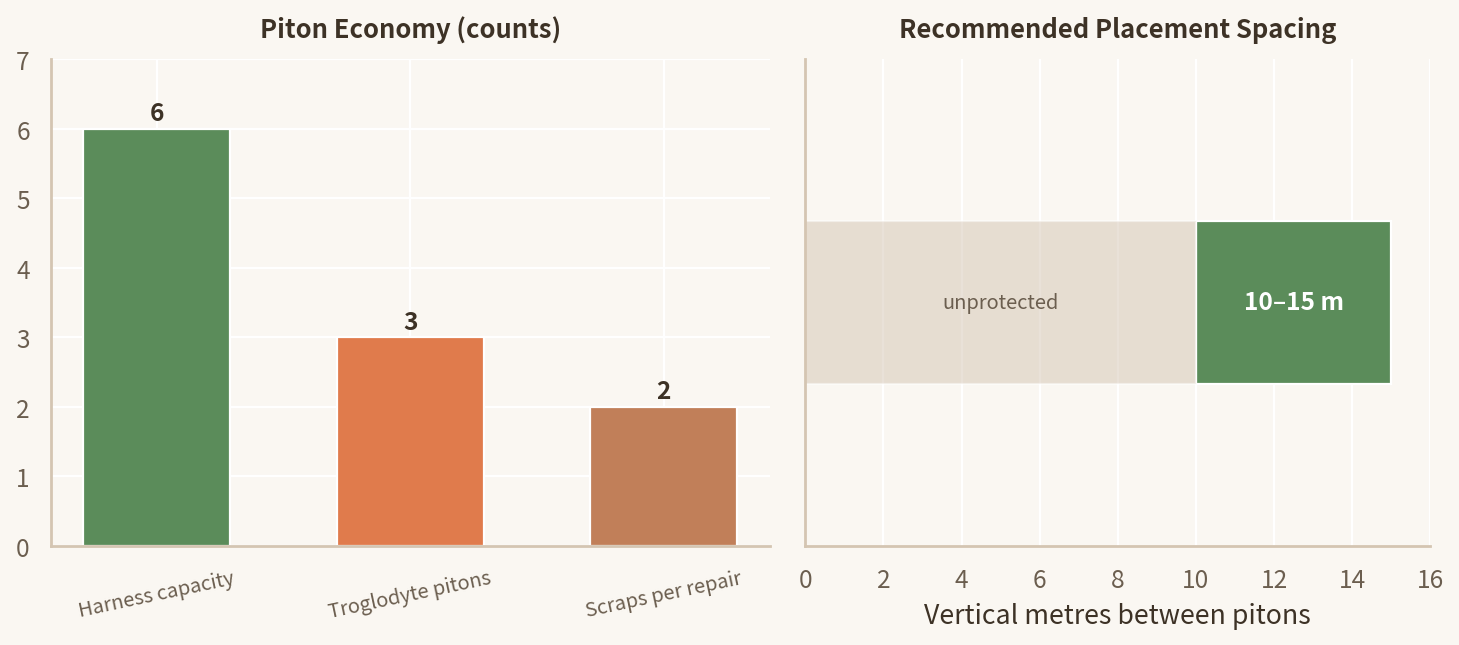
Piton supply and spacing at a glance — harness capacity, Troglodyte count, repair cost (left), and the community spacing rule of a piton every 10–15 vertical meters (right). Data from the table above.
The Off-Belay Trick: Pitons as Stamina Stations
Clipping into a placed piton and going off belay fully restores Aava's stamina — and while you hang there, the backpack opens, so you can eat, drink, refill chalk, and tape fingers without clinging to holds on empty reserves. This dual function changes what a piton is: not just insurance against falls, but a planned rest point you manufacture wherever the rock offers no ledge.
The off-belay rest: one piton gives you a full stamina refill, backpack access, and a checkpoint in a single stop — the reason piton placement is route planning, not just insurance.
All Three Troglodyte Piton Locations
Troglodyte pitons are indestructible and bite into any rock — including the dense brown rock that rejects standard pitons. They still count toward your six-slot harness, so think of them as quality upgrades, not extra capacity. All three come from guardian statues:
Guardian
Area
How to Reach It
Findability
The Vault Guardian
The Standing Stones
Head left from The Standing Stones campsite; The Child bivouac point nearby is the landmark. The statue sits in a sheltered alcove just beyond.
Easiest to find — usually the first one players get
The Ancient Guardian
The Palace of Wind
Look below the bridge leading to The Palace of Wind; a hidden path runs beneath the bridge supports.
Requires a short downward detour from the main route
The Secret Guardian
The Secret
Directly on the main path through The Secret area.
Unmissable — encountered naturally during progression
Locations per games.gg's Troglodyte piton guide, cross-checked with community coverage.
Five Piton Mistakes That Kill Climbs
Mistake
Consequence
Fix
Hoarding all six pitons
You reach the crux with a full harness and fall on ground a single piton would have made safe
Place at regular intervals on every wall; Climbot makes more from scraps
Rushing the placement timing
Poorly aligned pitons can crack on placement or fail under load
Take the extra second to center on the white marks; practice the timing in the gym
Placing during the crux instead of before it
You run dry mid-sequence with no anchor above your last checkpoint
The piton goes in before the hard moves start — treat it as the entry fee
Skipping Climbot repairs
New sections start with a depleted inventory
Repair broken pitons at Aava's tent before every major push; collect scrap fragments before they despawn
Wasting Troglodyte pitons on easy rock
Your only indestructible anchors are gone when brown rock and no-fall sections arrive
Reserve all three for dense brown rock, long no-fall stretches, and the final summit push
Advanced Uses
Rappel scouting
After placing a piton, rappel down (hold R2) to inspect the section below before committing. Climbing back up costs stamina; bad information costs the whole pitch.
Stamina chains
On very long vertical sections, place pitons purely as recovery stations and off-belay at each one. Expensive in pitons, but it turns impossible walls into a series of short climbs.
Pre-bivouac anchor
Before camping, place one piton just above the bivouac. It gives you a protected start for scouting the next section in the morning.
Scrap discipline
Broken placements drop scrap fragments that despawn. Grab them immediately — two scrap sets are a free piton at the next Climbot stop.
FAQ
How do I place a piton in Cairn?
Hold Up on the D-pad (key 3 on PC) to start placement, align with the white center marks that appear on the rock, then hit X (PlayStation) at the right moment as a slider crosses the bar to drive it home. Good timing protects the piton from breaking; bad alignment means it may fail under stress. If you dislike the timing challenge, Settings > Accessibility Options lets you skip it and guarantee successful placements.
How many pitons can I carry, and how do I get more?
Six on Aava's harness, plus extras in the backpack — and Troglodyte pitons count toward the same limit. You start with six, find more as loot around campsites and bivouacs, and Climbot crafts one piton from two sets of piton scraps. Broken placements drop scrap fragments too, so failed attempts are not total losses.
Where are the three Troglodyte pitons?
All three are hidden in guardian statues: the Vault Guardian, left of The Standing Stones campsite near The Child bivouac; the Ancient Guardian, below the bridge leading to The Palace of Wind; and the Secret Guardian, directly on the main path through The Secret area — that one is unmissable. Troglodyte pitons are indestructible and bite into any rock, including dense brown rock that rejects normal pitons.
How often should I place pitons?
Regularly — every 10–15 meters of vertical progress on standard terrain, and always immediately before a crux, overhang, or traverse. Pitons are checkpoints and full stamina-recovery stations, not emergency-only tools. Since they are lootable and craftable, the correct instinct is to use them, not hoard them.
Can I get pitons back after placing them?
Yes. When you pass a pitch and no longer need the anchor, some pitons can be retrieved, and Climbot can recover pitons left on solid terrain along your route. Retrieval is not guaranteed to be free — treat pitons as semi-consumable — but it is why over-placing on easy ground is a recoverable mistake rather than a permanent one.
Last updated: July 19, 2026. Piton mechanics verified against the release version of Cairn (PC/PS5, January 29, 2026). Fan guide — not affiliated with The Game Bakers.