Cairn Guide

Climb Higher. Live Free.

Cairn Guide hero banner
EQUIPMENT

Cairn Gear Guide: What to Carry Up Mount Kami

Cairn's gear system is deliberately small and physical: four quick-item slots on the D-pad, six pitons on the harness, and a backpack limited by space rather than weight. There is no equipment spreadsheet to min-max — instead, every item you carry has a clear job, and the skill is knowing which jobs the next wall demands. This guide covers what each piece of kit actually does, the real carry limits and craft costs, and which exploration upgrades are worth the detour. All mechanics are verified against the release version (January 29, 2026) via the official controls reference and community guides; where the game keeps a system qualitative, we describe it without inventing numbers.

Last updated: July 19, 2026

The Four Quick-Item Slots

On the wall, your entire toolkit is the D-pad. The full backpack stays closed unless you are at a bivouac or hanging off belay on a piton — which is why quick-item discipline matters more than inventory size.

SlotItemsWhen You Use It
D-pad Down (key 1)Backpack / quick restQuick breather on the move; full pack only opens at bivouacs or off belay
D-pad Left (key 2)Bottle / barometerHydration plus weather forecasting — check before every long push
D-pad Up (key 3)Piton / flashlightProtection placement and hold visibility in the dark
D-pad Right (key 4)Chalk / finger-tape stateGrip boost (next 12 handholds) and hand-condition checks
PITON/ lightBAG/ restBOTTLE/ barometerCHALK/ tapeD-pad quick itemsHarness — 6 pitonsspares ride in the backpackBackpacklimited by space, not weightpitonconsumables & supplies
Cairn's whole loadout: four D-pad quick items for on-wall actions, six pitons on the harness, and a backpack that limits you by physical space rather than weight.

Carry Limits & Craft Costs — The Real Numbers

Cairn tells you very few numbers directly, but these five govern every loadout decision you make.

ItemValueNotes
Quick-item D-pad slots4Down / Left / Up / Right — your whole on-wall toolkit
Pitons carried on harness6Spares can ride in the backpack; Troglodyte pitons count toward the same limit
Troglodyte pitons on Mount Kami3Indestructible; hidden in guardian statues
Piton scraps per Climbot repair2Scraps come from failed placements and loot
Grippy handholds per chalk application12Reapplied with D-pad Right
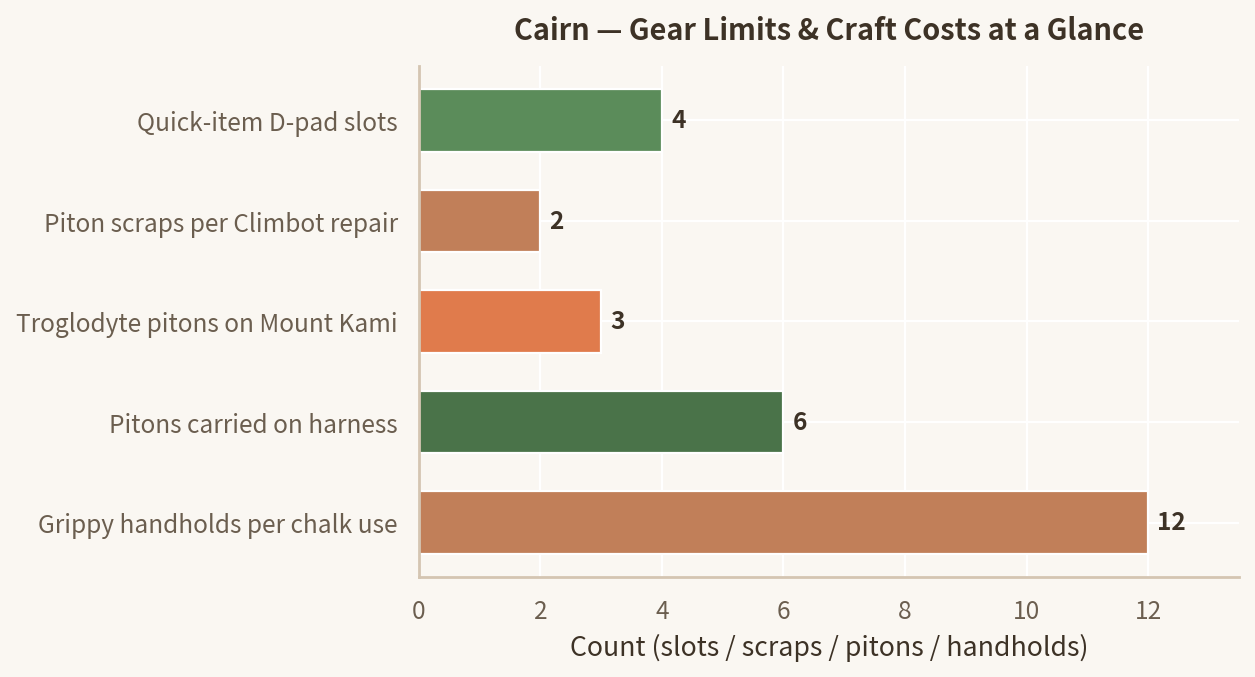
Bar chart of Cairn gear limits and craft costs: 4 quick-item D-pad slots, 2 piton scraps per Climbot repair, 3 Troglodyte pitons hidden on Mount Kami, 6 pitons carried on the harness, and 12 grippy handholds per chalk application.
The five counts behind every loadout decision, from the table above.

Every Piece of Kit, and Where It Comes From

GearRoleSourceNotes
PitonsCheckpoints, fall protection, rest stationsLoot + Climbot crafting (2 scraps each)Place at regular intervals; 6 on the harness
Troglodyte pitons (x3)Indestructible anchors that bite any rockGuardian statues: The Vault, The Ancient (below the Palace of Wind bridge), The SecretSave for no-fall and brown-rock sections
ChalkExtra grip on the next 12 handholdsClimbot — composted trashUse before cruxes and small-hold sections
Finger tapeProtects torn fingers, preserves grip enduranceLoot + suppliesApply at bivouacs before long pushes
Canteen + bottleHydration; cookable drinks restore energy tooRefill at streams and water sourcesRecipes turn water into dual-stat drinks
BarometerReads incoming weatherStandard kit (D-pad Left)Rain wrecks grip; cold complicates pitons — plan around it
FlashlightReveals holds in darkness and shadowed rockQuick items (D-pad Up / L2)Mandatory at night and in caves
Glowing glovesVisibility upgrade for dark and bad-weather climbingTroglodyte structuresPairs with flashlight for night pushes
Bivouac kit (tent)Warm up, cook, tape fingers, sleep, saveCarried from the startBivouac sites are finite — never skip one

Packing Rules for the Long Ascent

PITONS FIRST

Pitons are checkpoints, rest stations, and fall protection in one item. Never leave a bivouac without a full harness — Climbot turns two scrap sets into one piton, so repairs are cheap.

CONSUMABLE DISCIPLINE

Chalk and tape are renewable; pack space is not. Carry enough for the next two or three walls, not for the whole mountain — you will forage, loot, and craft along the way.

FOOD & WATER

Fill the canteen at every stream. Learned recipes turn plain water and foraged plants into drinks that restore energy and hydration together — better value per slot than raw snacks.

EXPLORE FOR UPGRADES

Troglodyte pitons, glowing gloves, chalk-bag upgrades, and recipes all come from caves and ruins off the main line. A short detour early pays for itself on every wall afterward.

FAQ

What are the four quick-item slots in Cairn?

The D-pad holds four context pairs: Down is your backpack / quick rest, Left is your bottle and the barometer, Up is pitons and the flashlight, and Right is chalk and finger-tape status. PC defaults are the number keys 1–4. Alternate quick actions are toggled with L2 (LT on Xbox, X on PC). These four slots are your entire mid-climb toolkit — the full backpack only opens at a bivouac or while off belay on a piton.

How do I get more chalk and pitons?

Climbot crafts both. One piton costs two sets of piton scraps, which drop from failed placements, loot containers, and environmental pickups. Chalk is produced whenever you compost trash with Climbot. Both are meant to be used liberally — the crafting loop exists so you never hoard.

Which gear upgrades should I prioritize?

The three Troglodyte pitons first — they are indestructible and bite into any rock type, including the dense brown rock normal pitons cannot penetrate. After that, the glowing gloves (visibility in darkness and bad weather), chalk-bag upgrades, and new food recipes, all found by exploring troglodyte caves, temples, and villages off the main line.

How does backpack space work in Cairn?

The backpack is limited by physical space, not weight — every item occupies real room in the bag, so packing is a layout puzzle. Because space is tight, decide before each push: pitons and chalk for the wall, food and water for the day, tape for your fingers, and leave behind whatever only helps in perfect conditions.

Do I need the flashlight and barometer?

Yes, and both are free to carry. The flashlight lives in the D-pad Up / L2 quick items and reveals holds in darkness, shadowed corners, and storms. The barometer (D-pad Left) reads coming weather so you can decide whether to climb or wait at a bivouac — critical because rain seriously degrades grip and cold makes piton placement harder.

Last updated: July 19, 2026. Gear mechanics verified against the release version of Cairn (PC/PS5, January 29, 2026). Fan guide — not affiliated with The Game Bakers.